

TechneSelected Work

Spencer Williams / Selected work, 2026

Building Better. Every Day.

Campaign reports, client dashboards, brand systems, and studio work from the 2026 cycle.

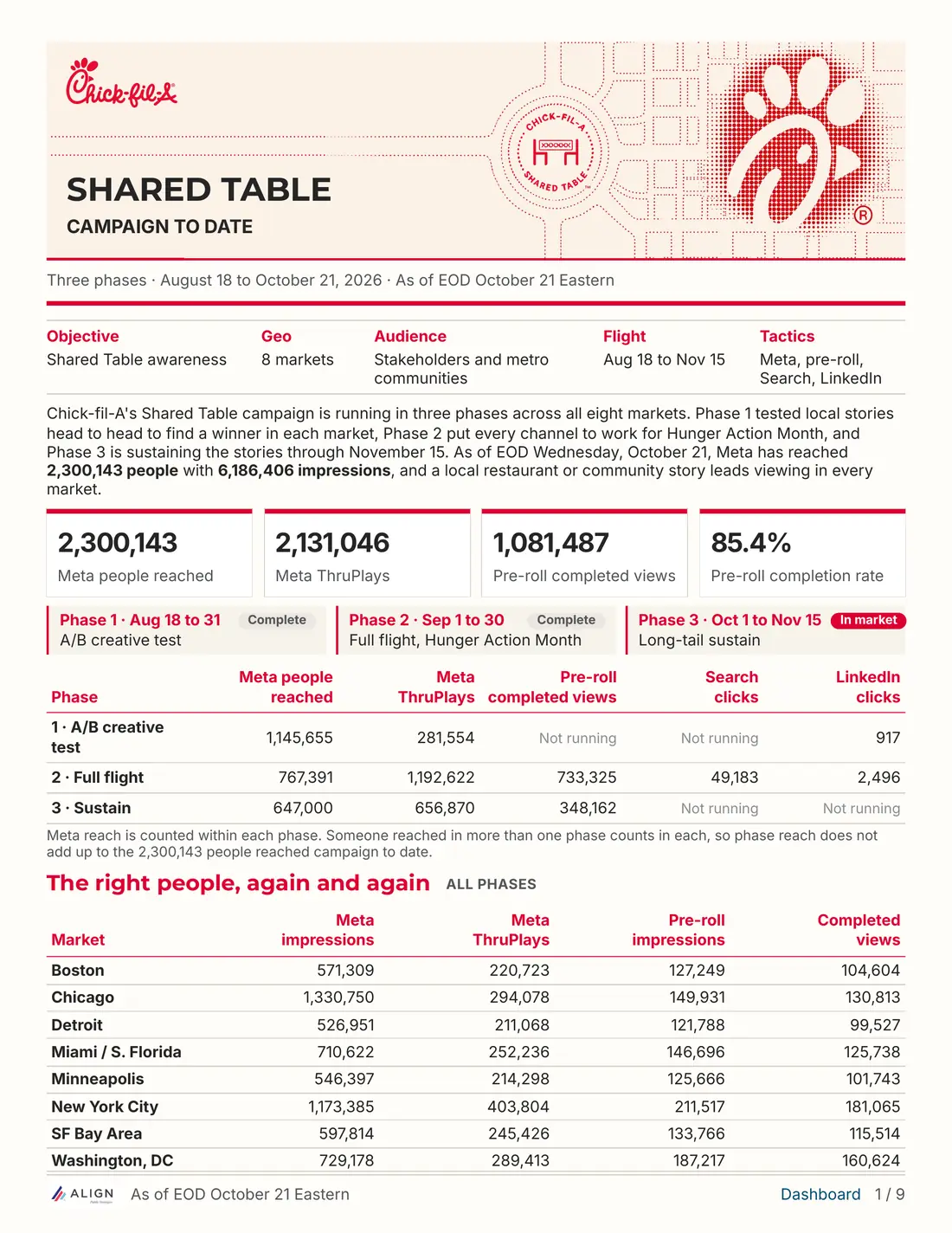
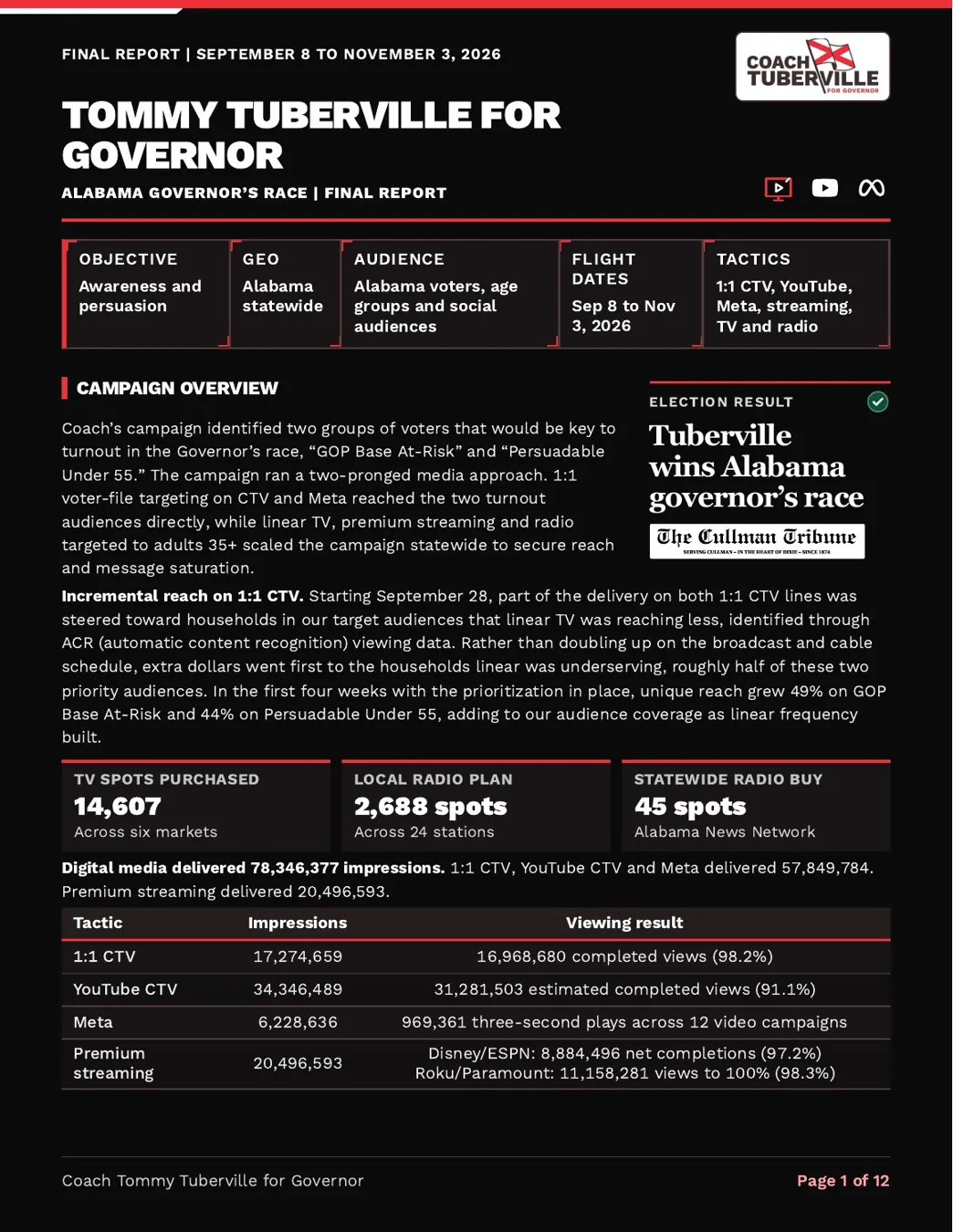
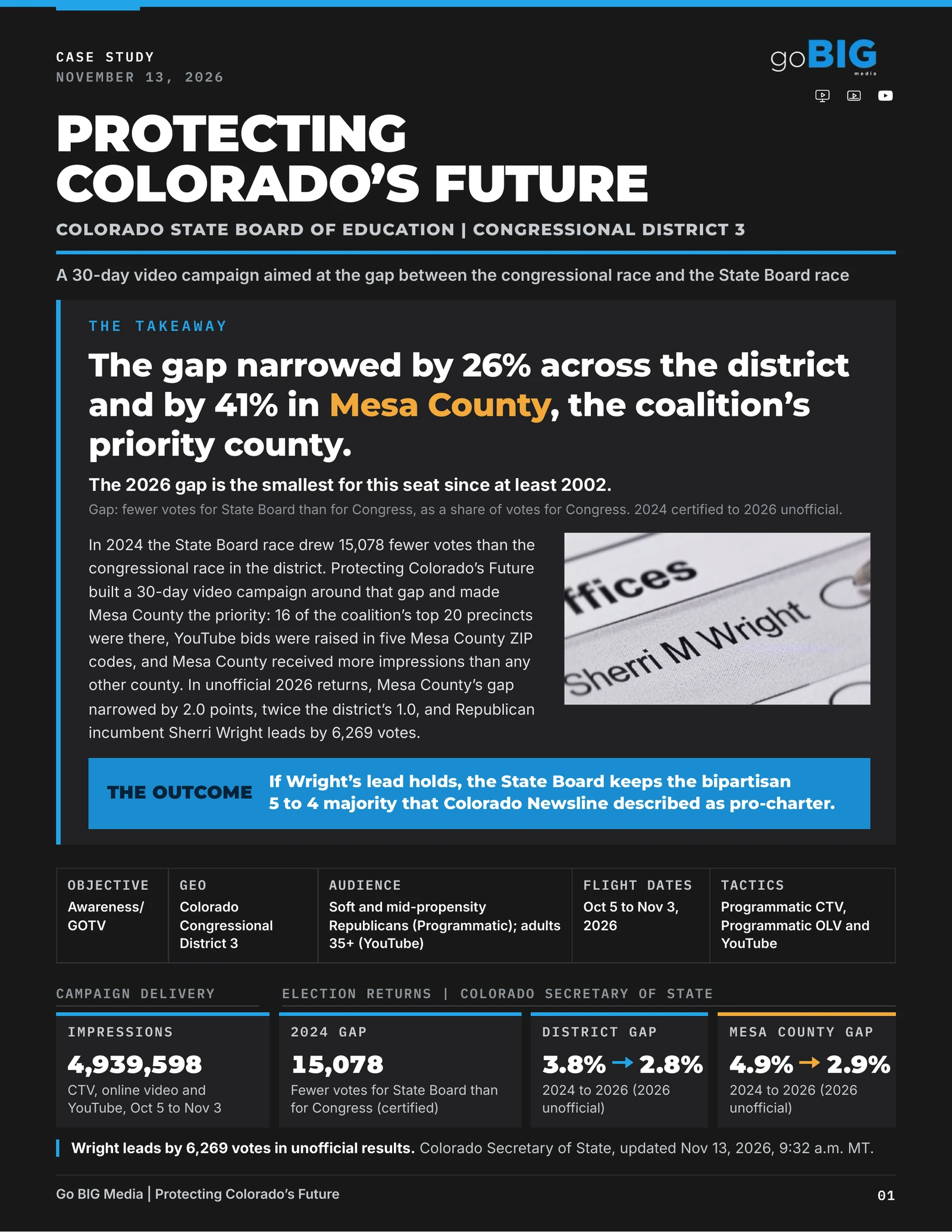
Original black-and-gold 3D Techne soccer ballFirst page of the Chick-fil-A Shared Table reportFirst page of the Tommy Tuberville for Governor final reportCover of Protecting Colorado’s Future, the case study for Go BIG Media
01Reporting / Election cycle

2026, by the numbers

My role in reporting

I led the overhaul of Techne’s reporting workflow and gave the team the tools to produce editorial reports. We automated client logo sourcing and cataloged platform metrics to fill gaps in BigQuery coverage.

Mapped impressions
507.9M
March 30–November 3 · BigQuery
Reporting inventory logo repository
9,018
November 19 snapshot · 8 categories
Election finals delivered
81
November 6–10 · Seven partner groups
Outbound emails to partners
3,286
Techne team emails this cycle with Digital Ads CC’d
Client dashboards
153
CompSignal snapshot · November 18
Report Versions Created
3,000+
Cycle estimate · Includes drafts and revisions
What these numbers cover
  • 507,923,246 recorded impressions across 432 distinct Monday campaign IDs with mapped warehouse rows from March 30 through November 3. This covers ingested and mapped sources. Warehouse mapping by Zach Cole.
  • The three-day production sprint ran November 4–6, immediately after Election Day. Partner deliveries and follow-up span November 6–10 across seven partner groups.
  • The Gmail count covers messages to partners across eight verified domains, with duplicates removed by message ID.
  • The November 19 snapshot of the Reporting Inventory logo repository counts each piece of media artwork once across its three background versions. The internal CompSignal hub supplied the November 18 dashboard count.
  • The cycle estimate includes drafts and revisions. The April 16–November 18 archive contains 2,887 distinct PDF and HTML editions after collapsing duplicate copies, paired formats and identical re-exports.
Campaign-branded report

Tommy Tuberville for Governor

A statewide campaign across CTV, YouTube, Meta, streaming, television and radio.

On page 04 Alabama county delivery

Madison and Jefferson counties accounted for about a quarter of 1:1 CTV impressions. Baldwin ranked third with 1,013,364. The map appears alongside examples of where the ads ran.


Page 04/12
Reporting workflowHow a report comes togetherSix stages
Stage 01 / Campaign context

Give the numbers a frame.

The objective, audience, geography, dates and tactics establish what the report needs to explain. In the Lawler report, those choices sit together above the campaign overview.

Campaign brief and flight planOpening campaign profile
My contribution

I shaped the intake and report structure around the questions an account lead needs to answer.

Page detailMike Lawler for Congress · p. 01
Tommy Tuberville

Tommy Tuberville for Governor

Tommy Tuberville for Governor, page 1: Campaign overview

The campaign ran statewide in Alabama from September 8 through November 3 across digital video, social, television and radio.

Election finals / November 4–6 production sprint

81 final reports. 3 Days.

  • 26Go BIG Media
  • 20Optimates
  • 12On Target Messaging
  • 12Parthenon Strategies
  • 8Campaign Engine
  • 2Think Big
  • 1Direct clients

78 covers shown, mixed across partners. Tuberville leads this chapter, and the two PORAC reports sit outside the wall.

Go BIG Media / Campaign case study

Protecting Colorado’s Future

The two-page final report became a 13-page case study for Go BIG Media. The client dashboard gives a third view of the campaign’s delivery through November 3.

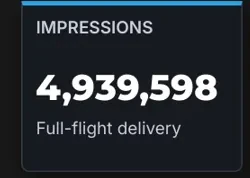
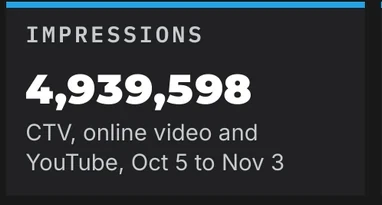
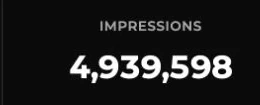
  1. Final reportData through November 3

  2. Go BIG case studyNovember 13

  3. Client dashboardCaptured November 19

    Open the live dashboard

4,939,598digital impressions across CTV, online video and YouTubeDelivery through Nov. 3, 2026

  • In the final report: 4,939,598 impressions.In the final report
  • In the case study: 4,939,598 impressions.In the case study
  • On the client dashboard: 4,939,598 impressions.On the client dashboard

The November 13 case study paired digital delivery with election context for Go BIG.

How the case-study kit turns a final into a story

Inputs
Final report and source evidence
Case-study modules
Partner brand guidelines
Reads
The final report, campaign objective and verified evidence.
What happens
Select the result and proof that warrant more space than the final report gives them.
Hands off
A case-study outline with sourcing.

Exception path Separate campaign delivery from claims about election or business impact.

Outputs
Case-study PDF
Editable source
Modules for the next partner
02January to November

Reimagining Reporting

How the reporting format evolved

From email updates to a client-ready visual showcase.

BeforeApril 10 · Jason Barrett for WV, update to Go BIG Media
Barrett for WV | 2026-04-07 to 2026-04-22Friday, April 10 · to Go BIG Media

Hey team,

Checking in here with a quick update to give insight into the initial performance of our ongoing digital efforts on behalf of Jason Barrett for WV.

A few early highlights:

  • Our campaigns had delivered 114K+ impressions by EOD yesterday, representing ~18.7% of total planned delivery early in flight
  • CTV VCR is holding strong at ~97%, driving near-complete message delivery in high-impact placements
  • The majority of YouTube impressions served thus far (65%) have been shown on TV screens
  • OLV is playing its part well, delivering a solid initial VCR (~66%), along with cost-effective impression volume, and balanced frequency (~6.4)

Overall, very pleased with the direction this campaign is moving in early in the flight.

Excerpt from the April 10 email as sent.

AfterThink BIG · PORAC Supreme Court Retention final report

Pages 1 and 8 of eight. The campaign overview sets out the results and the county map shows where the ads ran.

What the format changed

For partners
A report in the partner’s own brand, ready to forward.
For their clients
The whole buy in one document: delivery, creative and where the ads ran.

For Techne
One system in place of three formats, with checks built into the kit.
What the format gives each reader: nine specifics

For partners

Go BIG, Optimates, On Target Messaging, Parthenon, Campaign Engine, Think Big, Align

  • Ready to forward. Each report arrives in the partner’s own brand, written for the end client. Nothing has to be reworded or lifted out of an email first.
  • One report for each audience. When Go BIG needed separate decks for two funds with different donors, each fund got its own.
  • White label throughout. The partner’s logo, colors and type. No Techne mark on the page.

For their clients

Campaigns, committees, funds and their donors

  • The whole buy in one document. Delivery against the goal, completion, districts, creative and placements, in place of a list of bullets.
  • Where the ads ran. Named networks, publishers and local outlets show the inventory behind the numbers.
  • Easy to pass on. A client can hand the report to a donor or a board as it is.
For Techne

The team that builds and sends them

  • One system in place of three formats. Slide decks, long emails and one-off PDFs became one structure with shared components.
  • Checks built into the kit. 13 verification scripts compare the PDF with the source data and with the email.
  • Room to scale. 81 finals in the week of the election. A new partner needs a brand system, not a new template.

All eight milestones, January to November, from the sent record

From slide decks to editorial reports.

1 of 8

Before: a slide deck by email.

In January, the weekly report for a Go BIG client was a slide deck attached to a short email. This one is for Tom Leonard for Governor.

Tom Leonard for Governor, weekly report of January 30
The cover slide of the January 30 deck.

How the final report took shape

From the Jack 4 NJ deck to the election finals.

Go BIG Media’s 2025 Jack 4 NJ final helped teach our reporting model what a thorough final looks and sounds like. We used it to guide which metrics and campaign details to cover, which charts and maps to use, and how to explain the findings in Techne’s voice.

  1. 2025 final Slide 1 of 36

    Original Go BIG deck

    Cover of Go BIG Media’s November 5, 2025 Jack 4 NJ final.

  2. 2026 design study Page 10 of 10

    Portrait reconstruction

    A labeled map and ranked counties answer where delivery concentrated. The page keeps the snapshot’s capture date.

  3. 2026 final Page 4 of 12

    In the election finals

    The Alabama final uses the same map-and-ranking layout for 1:1 CTV, with the key finding above the map.

Teaching the agents to write like Techne.

Before drafting, the reporting agents read examples pulled from three years of our strongest reports. We used those examples to show them how to look for the story, draw out an insight a partner can use, and write it in our voice.

“Madison and Jefferson together accounted for about one quarter of 1:1 CTV impressions.”
Tuberville final report · page 4
  1. Find the story

    Start with the campaign’s goal and what changed. Choose the evidence that tells the reader something they need to know.

  2. Explain why it matters

    Connect the finding to the flight, the audience, or the job each tactic had to do. Make clear what the evidence supports.

  3. Sound like us

    Lead with the point in plain language. Write the way we brief a partner so they can use the explanation with their client.

Election finals, October 22 to November 10

Timing out the final reporting workflow

  1. October 22

    Plan

    • How to tell each result
    • Which sources cover each channel
    • What to do with figures that have not settled
  2. November 1

    Reference package

    • 2,141 files in one handoff
    • A golden report for each partner
    • Standards, registries, scope and QA rules
  3. November 2

    Election-night plan

    • Settlement and editorial windows assigned
    • 79 plan rows tied to context and sources
    • The outcome researched for every row
  4. November 3

    Dress rehearsal

    • First builds
    • Evidence checks
    • Layout review on rendered pages
  5. November 5

    Build and review

    • 78 PDFs and 218 pages indexed
    • Every PDF and email hash-checked
    • Critique ledger, repairs and visual QA rounds
  6. November 6 to 10

    Review hub and sends

    • 81 reports delivered to 7 partner groups
    • A delivery folder for each partner
    • Send approval kept separate from review

Counts and sources behind the 81 finals

Partner deliveries · November 6–10

Sources included 2,141 files in the November 1 reference package, 2,034 media logo registry entries in the July 10 snapshot, 1,986 creatives in the creative registry, 6,136 delivery IDs mapped to those creatives, 79 rows in the election-night plan, 293 records in the campaign context review, 13 verification scripts in the kit. Working packages included Report PDF, Client email, Editable HTML, Logos and assets, Source evidence. Delivery by partner group. Go BIG Media received 26. Optimates received 20. On Target Messaging received 12. Parthenon Strategies received 12. Campaign Engine received 8. Think Big received 2. Direct clients received 1.Collected and compiledBuilt and reviewedDelivered to2,141files in the November 1 reference package2,034media logo registry entries in the July 10 snapshot1,986creatives in the creative registry6,136delivery IDs mapped to those creatives79rows in the election-night plan293records in the campaign context review13verification scripts in the kit81final reportsWorking packageReport PDFClient emailEditable HTMLLogos and assetsSource evidence26Go BIG Media20Optimates12On Target Messaging12Parthenon Strategies8Campaign Engine2Think Big1Direct clients
Collected and compiled
2,141
files in the November 1 reference package
2,034
media logo registry entries in the July 10 snapshot
1,986
creatives in the creative registry
6,136
delivery IDs mapped to those creatives
79
rows in the election-night plan
293
records in the campaign context review
13
verification scripts in the kit
81final reports

The working package paired the report PDF and client email with editable HTML, logos and assets, and source evidence.

Delivered to
  • 26Go BIG Media
  • 20Optimates
  • 12On Target Messaging
  • 12Parthenon Strategies
  • 8Campaign Engine
  • 2Think Big
  • 1Direct clients
How the finals were counted

Spencer confirmed delivery of the 81 reports counted by partner group from the November 6 final review index. The index lists 86 editions when it includes alternates and splits.

Campaign research

Starting from Zach’s campaign context sheet, the November 3 review logged 293 evidence records across 79 active and 24 deferred entries. Those records included 290 source links and three direct clarifications.

The editorial reference

The Jack 4 NJ study gave the finals a model for showing campaign evidence. Three years of standout reports gave the agents examples of how to explain it.

See the reports side by side
The shared Reporting Assets folder: 11 items, 3,519 files

The shared Reporting Assets folder, November 18

Where the system lives.

One shared Drive folder holds what the team needs to build a report: the kit, the schedule, the platform exports and both logo libraries.

  1. Reporting Inventory – LogosMedia logos for the inventory pages, with their indexes1,639
  2. Client/Partner Agency LogosClient and partner logos, originals and report-ready copies1,102
  3. StackAdapt ReportsPlatform exports, filed by report type395
  4. Reporting OperationsThe shared schedule, run manifests and drafts295
  5. Programmatic R&F ReportsReach and frequency exports by campaign44
  6. Editorial ReportsThe report archive by agency, client and date22
  7. Case Study KitKit versions, module catalogs and example pages15
  8. report_kitThe current reporting kit and its runbook4
  9. Start here guideHow to use the folder1
  10. Chat digest setupSetup guide for the team’s Chat digest1
  11. Team packetOnboarding for the dashboards and shared assets1
3,519files in 11 items
The folder in Google Drive.

Two libraries behind every report

Every logo, ready before the report.

New media plan submissions in Monday feed an automated logo-sourcing workflow. Agents source the client’s artwork and catalog verified logos so they’re ready when the team builds a report. The media library supplies the network and publisher logos for inventory pages.

Client logos

140
clients represented, one card each
280
original files in seven formats
274
report PNGs, and 274 dashboard WebPs
  • 50CAN
  • Abby Doyle for Auditor
  • AFC Inc C4
  • AFC OK
  • AFC Victory Fund
  • American Federation for Children Growth Fund
  • American Jobs & Growth PAC
  • American Petroleum Institute
  • American Workers First PAC
  • Americans for Fair Markets
  • Amy Drake
  • Andrew Klein
  • Andrew Morrison
  • Anna Paulina Luna for Congress
  • Antiques and Garden Show of Nashville
  • barre3 Franklin
  • Beacon Center of Tennessee
  • Belinda Keiser
  • Better West Virginia
  • Bev Slough
  • Bill Hancock
  • Blake Miguez
  • Bluegrass Institute
  • Bonnie Jackson
  • Brian Hawkins
  • Brian Helton
  • Bynum for Fairview
  • CalHFA
  • California Fuels & Convenience Alliance
  • California Life Sciences
  • CALSAGA
  • Charlie Nguyen
  • Chick-fil-A
  • Chick-fil-A Shared Table
  • Choose Freedom Inc
  • Chris Lanier
  • Chris Vincent
  • Citizens for Traditional Values - Michigan
  • Clark Boyd
  • Clean Energy Fuels
  • Community Partners for Education - Vote Yes Northwest
  • Connecticut Republican Party
  • Dean Black
  • Deborah Wesley
  • Donovan Bradley
  • DoorDash - Unlocking Main Street
  • Douglas County Future Leadership Fund
  • Duval Citizens for Better Schools
  • Energy Citizens
  • Erin Huntley
  • Florida Institute of CPAs
  • Friends of Christine Drazan
  • Fry for Congress
  • Genesee County Republican Party
  • Goo Goo Cluster
  • Growing Marlettes Economy
  • Heather Brofford
  • Illinois Pork Producers Association
  • Innovation Council
  • Jason Barrett
  • Jason Tunney for Senate
  • Jeff Holcomb
  • Jeffrey T. Rogg for Judge
  • Jessica Baker
  • Jim Pillen for Governor
  • Joe Giralo
  • Joe Hathaway for Congress
  • Joe Strada
  • John Jordan
  • John Rodgers for Vermont
  • John Rutherford
  • John Sununu
  • Kara Champion
  • Kathryn Birren
  • Katie Rose
  • Keep America First
  • Kentucky Liberty Alliance
  • Kevin Grantham for Treasurer
  • Lee Reeves
  • Louisiana Kids Matter
  • Mariana Minerals
  • Mark Campbell for State Representative
  • Mary Draves
  • Matt Lufrano
  • Matt Moore
  • Merchants Payments Coalition
  • Michael Lankford
  • Michael Schostak
  • Mike Lawler for Congress
  • Mike Sparks
  • Missouri Hospital Association
  • Morris County GOP
  • National Right to Work Committee
  • Natural Allies for a Clean Energy Future
  • New Day Colorado
  • NMC2
  • Ohio Kids CAN
  • Oregon Republican Party
  • Orlando Dreamers
  • Palm Beach Quiet Skies
  • Pat Proctor for Kansas
  • Patti Adair
  • Pearson Fuels
  • Physician Association of California
  • PORAC
  • Recycling Is Real
  • Rental Housing Association of WA PAC
  • Republican Party of Florida
  • Republican Party of Kentucky
  • Retail Council of New York State
  • Rick Shepherd
  • RINO Hunter
  • Rob Bresnahan - Rob for PA
  • Rob North
  • Rockland County Republican Committee
  • Sadeghi for Commissioner
  • Sam Williams
  • Sara Carter
  • Schmidt for Ohio
  • Scott Hege
  • Sean Hutson for State Representative
  • Sharon Ray for Recorder
  • Shubert for Ohio
  • Stacey Batey
  • Stephanie Carkin
  • Tammie McClafferty
  • Tate for Sheriff
  • Teddy Collins for Colorado
  • Tennessee Hospital Association
  • Tennessee House Republican Caucus
  • TennesseeCAN Action Fund
  • Terrance Freeman
  • Texas Digital Infrastructure Alliance
  • The Landing Strip
  • TN Eye Surgeons
  • Together for Summit
  • Tommy Tuberville
  • Van Drew for Congress
  • Walter Price
  • Yes On 2

Media logos

9,018 report-ready logos

November 19, 2026 Drive snapshot. Each artwork comes in transparent, white-background and black-background versions.

Newspapers & publishers
3,978
Local TV stations & broadcast brands
1,386
Sports teams, leagues & brands
1,160
Mobile apps
1,000
Streaming services & channels
714
Radio, audio & podcasts
515
Digital platforms & media companies
216
National TV networks
49

104 logos selected for the wall below

Streaming
  • Netflix
  • YouTube TV
  • Disney+
  • Hulu
  • HBO Max
  • Peacock
  • Paramount+
  • Apple TV
  • Prime Video
  • The Roku Channel
  • Tubi
  • Pluto TV
  • Sling TV
  • Fubo
  • DIRECTV STREAM
  • Curiosity Stream
  • Discovery+
  • STARZ
  • MGM+
  • Crunchyroll
  • BritBox
  • Criterion Channel
  • Kanopy
  • PBS
National news
  • ABC News Live
  • NBC News
  • CBS News
  • CNN
  • Fox News
  • BBC News
  • CNBC
  • Bloomberg TV
  • PBS News
  • Associated Press
  • Reuters
  • The Wall Street Journal
  • The New York Times
  • The Washington Post
  • USA TODAY
  • NPR
  • Politico
  • The Hill
  • NewsNation
  • Al Jazeera English
  • FOX Business
  • Noticias Telemundo
  • Newsweek
  • TIME
Local news stations
  • ABC7 Los Angeles
  • ABC7 New York
  • ABC7 Chicago
  • ABC7 Bay Area
  • 6abc Philadelphia
  • ABC13 Houston
  • ABC10 Sacramento
  • 7 News Washington
  • NBC4 Los Angeles
  • FOX 11 Los Angeles
  • CBS Los Angeles
  • KPIX San Francisco
  • NBC New York
  • FOX 5 New York
  • CBS New York
  • NBC Chicago
  • FOX 32 Chicago
  • NBC10 Philadelphia
  • CBS Philadelphia
  • FOX 29 Philadelphia
  • FOX 4 Dallas–Fort Worth
  • NBC 5 Dallas–Fort Worth
  • WFAA Dallas–Fort Worth
  • KPRC Houston
  • KHOU Houston
  • FOX 26 Houston
  • 12News Phoenix
  • FOX 10 Phoenix
  • Arizona’s Family
  • KING 5 Seattle
  • KOMO News Seattle
  • KIRO 7 Seattle
  • FOX 13 Seattle
  • WSB-TV Atlanta
  • FOX 5 Atlanta
  • 11Alive Atlanta
  • WBZ Boston
  • 9NEWS Denver
  • WRAL Raleigh
  • WCCO Minneapolis
Sports entertainment
  • ESPN
  • Fox Sports
  • CBS Sports
  • NBC Sports
  • NFL
  • Bleacher Report
  • MLB Network
  • Barstool Sports
  • Willow TV
  • MLB
  • The Athletic
  • Fubo Sports Network
  • Sports Illustrated
  • FloSports
  • DAZN
  • SEC Network
03Partner brands / Brand systems

How one editorial system renders across partners

Inputs
Approved brand references
Report content model
Shared layout and QA rules
Reads
Partner logos, type, colors and client brand material.
What happens
Check which marks and design treatments fit the intended surface.
Hands off
A sourced set of brand inputs.

Exception path Resolve missing or competing logo versions before applying them.

Outputs
Partner themes
Reusable report modules
Reviewed specimens and exports

Dozens of report layouts. Every partner’s brand.

We built reusable rules for type, logos, and layout so the team can produce reports in each partner’s brand, ready to forward to clients.

All specimens use the same synthetic data for delivery, placements, and retention. Nine systems exist in total, including MAD Global Strategy and Chick-fil-A.

Techne

A client brand system, built for Align Public Strategies

Chick-fil-A Shared Table.

A full brand system for one client, with a masthead and graphics made for the report. The cream three-phase report covers the creative test, the full flight for Hunger Action Month and the sustain phase, across eight markets.

Report
9 pages, 5 shown here

How the Shared Table report was made

Inputs
Chick-fil-A brand references
Three campaign phases
Creative and delivery records
Reads
The creative test, Hunger Action Month and sustain flight.
What happens
Give each phase its own measurement window and show how it contributed to the year-to-date read.
Hands off
A report outline with three defined phases.

Exception path Keep tests and later delivery in their own scopes when comparing performance.

Outputs
Shared Table report
Custom graphics and brand system
Page 1 / Campaign to date

Partner onboarding

Get access to client pages and ad accounts.

From an end-client login to campaign access

Inputs
End client and partner identity
Planned ad platforms
Partner onboarding toolkit
Reads
The channels the campaign needs.
What happens
Show only the permission steps that apply to this client.
Hands off
A short setup path.

Exception path Route Google Ads setup to Techne when required.

Outputs
Verified Page and ad account access
Campaign setup handoff

Goal:

Give the end client one setup guide they can follow. That helps partner agencies get the right permissions for Pages and ad accounts quickly, so the team can move into campaign setup.

  1. Choose the platforms

    Start with the channels where the campaign will run.

  2. Grant partner access

    The end client approves access to the right Pages and ad accounts from their own login.

  3. Verify and hand off

    Confirm the permissions so campaign setup can begin. Route any Google Ads setup to Techne.

Think BIG portal prototype

What the end client sees

The end client selects the platforms they use. The prototype then shows the relevant instructions, starting with how to grant partner access.

Five partner onboarding kits

The same access instructions are available in each agency’s brand, so partners can give clients an onboarding guide that feels like their own.

Think BIG
Go BIG Media
Parthenon Strategies
Campaign Engine
Align Public Strategies
04Dashboard hubs / CompSignal

How the dashboard directory stays connected

Inputs
Monday campaign records
Zach’s BigQuery mapping
Partner and client identifiers
Reads
Campaign identifiers and ingested platform data.
What happens
Associate delivery with mapped Monday records and preserve scope.
Hands off
Client and campaign data the dashboard can read.

Exception path Unmapped records surface as coverage gaps.

Outputs
Internal directory
Partner command centers
Client dashboards and request queue

From the directory to the client dashboard

Explore three levels of CompSignal: the Techne directory, On Target’s partner hub and a client dashboard built for Natural Allies.

Built with Zach Cole
compsignal.appInternal directory

Step 1 of 3 / Internal directory

Start in the Techne directory.

Every partner agency and client dashboard is on one internal screen. Search by client, partner or campaign, then open a partner.

November 18 capture with 153 client dashboards. The first row of partner cards is shown below the overview.

More dashboard views

  • Go BIG command center
  • On Target campaign shelf
  • Daily delivery view
  • Directory: partner agencies
  • Directory: delivering now
05Competitive intelligence / CompSignal

How a competitive briefing comes together

Inputs
FCC political files
Meta and Google ad libraries
Booked-spend exports and issue history
Reads
The account brief and previous issue.
What happens
Define the advertiser set, geography and period. Track changes since the last issue.
Hands off
A consistent comparison window.

Exception path Ambiguous advertisers or dates are flagged before aggregation.

Outputs
Published issue
Historical comparison record
Coverage notes

Who’s spending, where, and on what

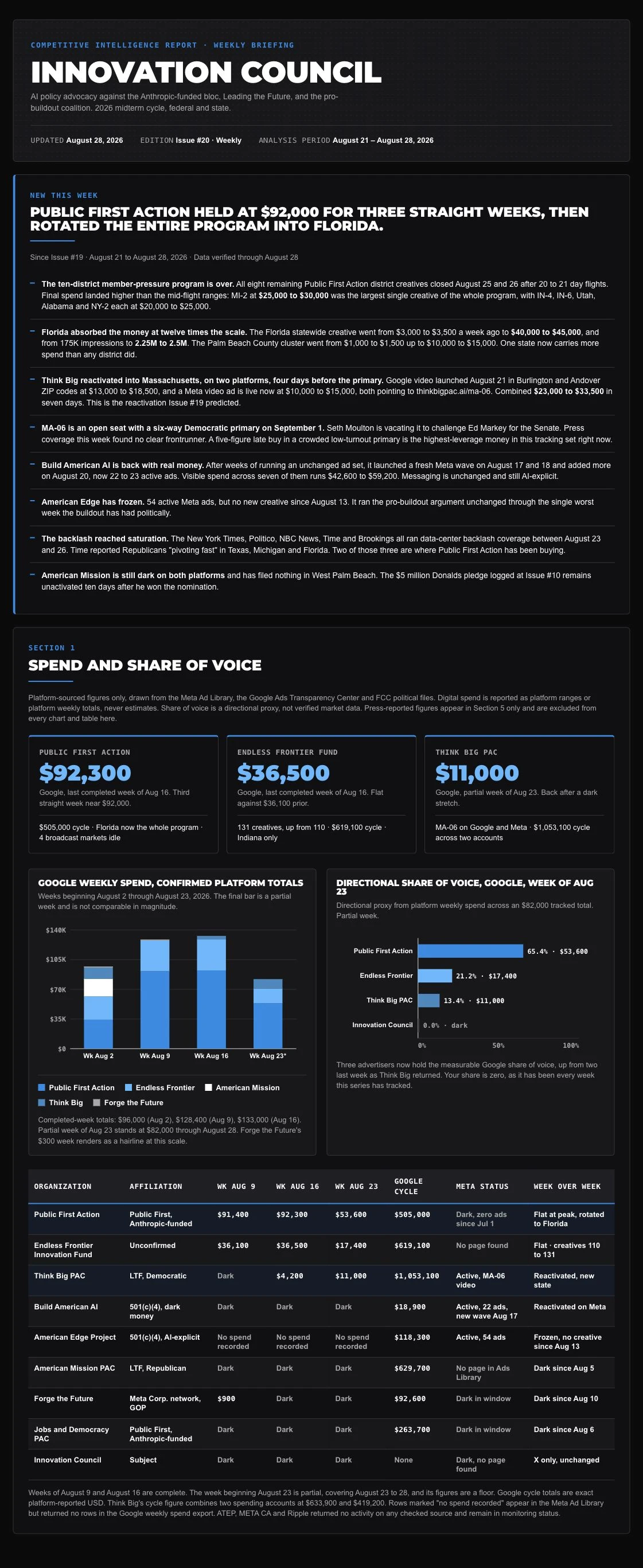
Recurring reports on what competitors are buying and how their activity changes. Each series draws on sources like the FCC political files, Meta and Google ad libraries, and booked-spend exports.

compsignal.appScroll the issue
Innovation Council weekly briefing, opening sections.

AI policy advocacy

Innovation Council weekly briefing

A weekly read on the AI policy advertising landscape. It tracks what competing groups are buying, where they shift their activity, and what changes from week to week.

In the record
Issue 20 · August 28, 2026
Source
CompSignal issue archive
Shown
Weekly briefing and spend snapshot
06Skill library / AI in the work

How skills fit into campaign operations

Inputs
Plan and source of truth
Platform builds and exports
Brand rules and review criteria
Reads
The campaign task and its source material.
What happens
Choose the skill that fits the job, from editorial reporting or asset sourcing to launch review, closeout or team coverage.
Hands off
A defined input and expected result.

Exception path Resolve missing records before treating a check as definitive.

Outputs
Reviewed findings
Assigned follow-up
Traceable campaign records

The skills behind the work.

Throughout the year, I audited my day-to-day work for tasks I could simplify or standardize. I turned those recurring tasks into AI skills and workflows so I could handle more reports, campaign checks, and team handoffs each day.

Brand guidelines

Collects and checks the source materials, extracts the logo, color and type rules, then tests them in report and dashboard examples.

Inputs Logo files · Color and type references · Landing pages

  1. Find the source

    Match the official logo and live brand references.

    Verified reference set
  2. Codify the brand

    Turn colors, type and logo treatment into reusable rules.

    Brand tokens and rules
  3. Proof a real page

    Apply the rules to a report and inspect the result.

    Reusable report components

Outputs Brand tokens · Logo rules · Report components

Design specimen with synthetic values.

Geographic reporting

Heatmaps, built to repeat.

We standardized county delivery maps for statewide finals. An early modeled Duval turnout study shows how the same checks apply to district maps. The Duval results explorer uses the certified results and official turnout files.

  1. Set the scope

    Confirm the metric, reporting window and channel before choosing the map. Use delivered impressions for a delivery map and a named denominator for turnout.

  2. Bind the boundaries

    Join source rows to official county or district IDs. Record the boundary vintage and account for places the source leaves unlocated or unmatched.

  3. Reconcile and scale

    Check mapped totals against the matching source extract. Distinguish known zero from missing data. Use a volume scale for impressions, matched party scales for turnout and a zero-centered scale for the gap.

  4. Review the export

    Check legends, labels and small districts at the final size. Carry the source, dates and model notes into the report, email or social graphic.

Duval County · The party maps share a 25% to 75% scale. Party splits for early, mail and provisional ballots are modeled.
07Campaign operations / Board upkeep

Every active Monday line, checked.

Built to run on weekdays, the sweep checked active campaign lines in Monday against signed insertion orders (IOs), source-of-truth sheets (SOTs), and reporting schedules. It applied corrections it could verify and flagged exceptions for review.

10
partner boards
2,321
agent-tagged board actions
2,280
recorded field updates
  1. Every active line read, on all ten partner boards
  2. The right IO linked on the line
  3. Signed IOs downloaded, marked SIGNED and filed in the Signed IO repository
  4. Campaign links in the right SOT
  5. Planned allocations matched to the SOT
  6. The reporting day set

Agent updates by field

August 26–November 18, 2026 · Monday activity logs

  • 738Budgets and allocations
  • 474Status and open items
  • 386Dashboards and documents
  • 229Campaign details
  • 187Dates and reporting days
  • 135Intake links
  • 116Insertion order links
  • 12Billing references
  • 3Team assignments

Field updates include routine work and repairs. The other 41 actions include item moves, renames, and subscriptions.

75 corrections confirmed by receipts

These include corrections documented in sweep reports and two later links replaced with signed orders. The records available for Sheets and Drive cover only part of the cycle.

  • 30SOT titles
  • 15Monday IO links
  • 12Planned allocation fields
  • 8Reporting days
  • 5Monday links inside SOTs
  • 4Signed IO PDFs filed
  • 1Projected net control
08Creative studio / Techne brand

How the Techne studio work was made

Inputs
Techne brand identity
Editable hexagon model
Creative concepts and references
Reads
The brand, subject and intended format.
What happens
Decide how the hexagon or campaign idea should appear in the scene.
Hands off
A visual concept and shot direction.

Exception path Discard scenes where the mark or concept reads poorly.

Outputs
Brand film
Logo reveal
Artwork and editable assets

In the studio.

Techne identity

The Techne mark in polished gold.

Original flat gold Techne hexagon

Building the Techne hexagon in 3D gave us a centerpiece for many of the films and stills featured here.

Motion / 30 sec

Brand awareness film

Production notes

I made the brand film around the screens where Techne’s work appears.

Social creative

The 2026 World Cup social posts.

Six-second social video
Storyboard

Brand artwork / Four scenes

Hidden in Plain Sight

Look for the Techne hexagon in the river channels, the tree canopy, the sea ice and a bookstore sign.

Tropical Delta Braids
Autumn Canopy
Offshore Ice Drift
Rainy Bookstore
09Team Techne

How the March Madness site worked

Inputs
Tournament bracket
Team and model picks
Game results
Reads
The bracket schedule and the team invitation.
What happens
Set up a common view so teammates and the three models can be followed together.
Hands off
A bracket comparison for the team.

Exception path Keep the entrant lists distinct so the scoring is readable.

Outputs
Bracket site
Round-by-round results
Final leaderboard
Explore the website ↗

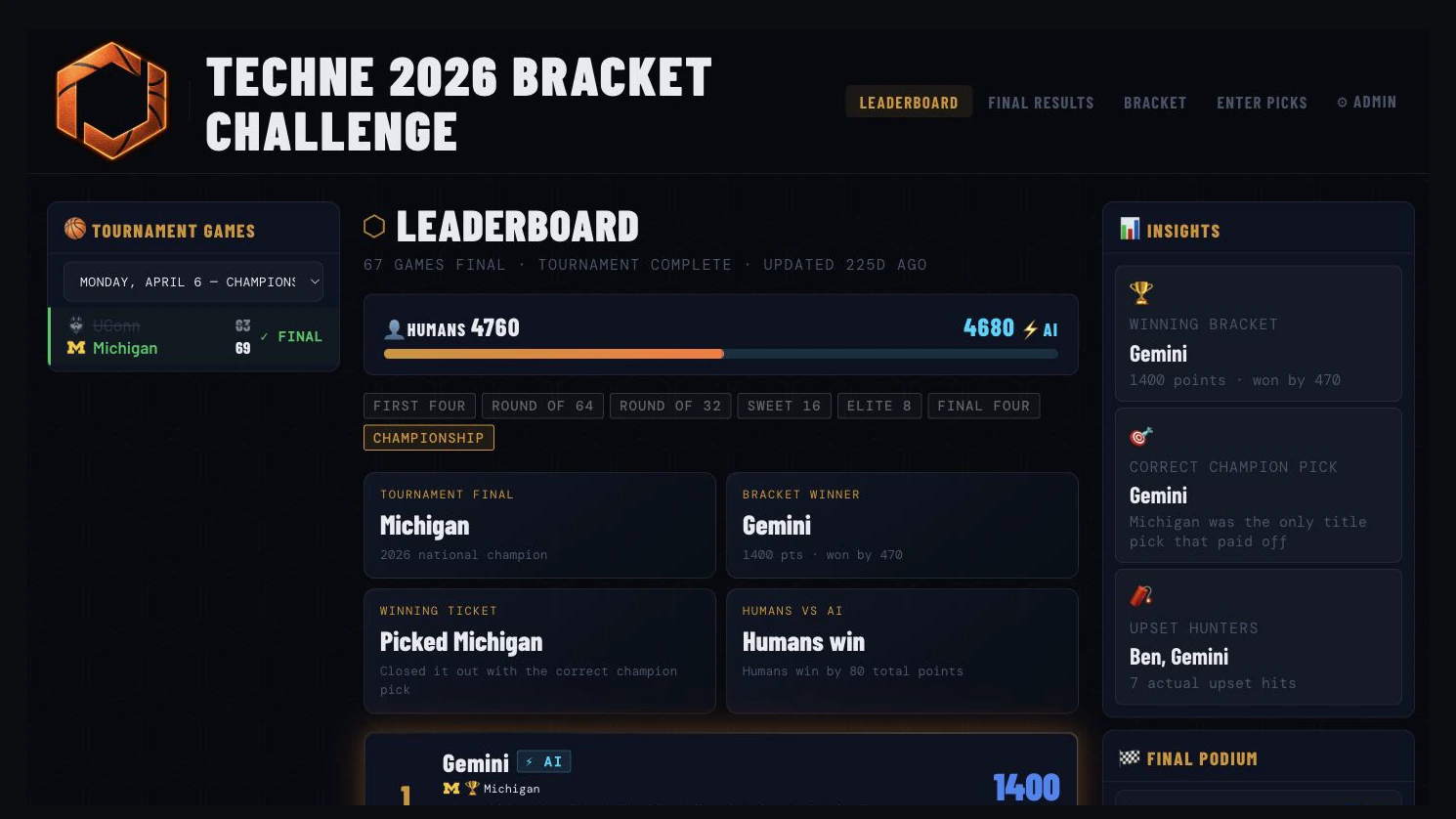
Techne’s March Madness bracket challenge

On March 16, the team got an invitation to pick brackets alongside three AI models. Three days later, everyone could follow the games, picks and standings on one site.

How it started

I organized the bracket challenge and shared the site with the team as the tournament got underway.

10Election analysis / Jacksonville, Florida

Duval County, district by district.

Explore the certified 2026 general election results by council district and precinct. Switch between contests, turnout and voting methods, or select a district for its exact values.

Techne Media / 2026 cycle

Explore all projects

I look for a better way to do the work every day. When I find one, I make it easy for anyone on the team to pick it up and use it again.